



Wrist pain after typing, forearm tightness from mouse use, and shoulder discomfort during long coding sessions can develop gradually. Symptoms may improve over the weekend but return when the workweek begins.
Repetitive strain injuries in tech workers can develop from prolonged computer use, repeated movements, and limited opportunities for recovery. Rest may temporarily ease discomfort, but symptoms often return when the same physical demands continue.
Understanding what contributes to repetitive strain and how to adjust those demands can help reduce recurring discomfort.

What Is a Repetitive Strain Injury?
A repetitive strain injury (RSI) refers to pain or dysfunction associated with repeated movements, prolonged positioning, or sustained physical activity. For tech workers, these conditions can affect the muscles, tendons, nerves, and surrounding tissues in the wrists, forearms, shoulders, and neck.
The Occupational Safety and Health Administration (OSHA) explains that repetitive tasks can limit recovery time for muscles and tendons. Risk increases when repeated movements are combined with awkward postures, forceful activity, or prolonged muscle tension.
What Happens to Muscles and Tendons?
Tendons connect muscles to bones and help transfer the force needed for movement. Repeated strain that exceeds a tissue’s ability to recover can lead to pain and changes in tendon structure. Persistent tendon problems can involve tissue remodeling rather than inflammation alone.
Holding muscles in the same position for extended periods can also cause fatigue and discomfort. When nerves become irritated or compressed, symptoms may include tingling, numbness, or weakness.
Because muscles, tendons, and nerves can produce different symptoms, identifying the affected structures is important when determining appropriate treatment.
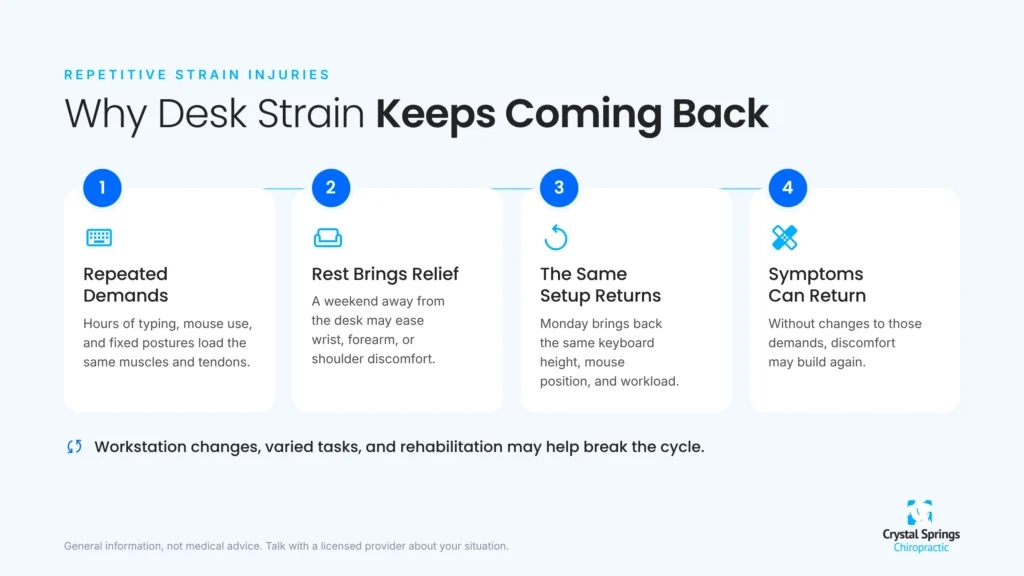
Why Repetitive Strain Injuries Don’t Always Resolve With Rest
Rest can relieve mild repetitive strain symptoms by reducing stress on irritated tissues. However, discomfort may return if the underlying physical demands remain unchanged. Persistent symptoms can require workstation adjustments, changes in activity, or rehabilitation.
Repeated Movement Patterns
Taking a break from typing can temporarily relieve wrist discomfort. However, returning to the same keyboard height, mouse position, and workload can trigger symptoms again.
Adjusting workstation ergonomics, varying tasks, and incorporating regular movement breaks can help reduce repeated strain.
Reduced Tissue Tolerance
Muscles and tendons adapt to the demands placed on them. Extended inactivity can reduce strength and tolerance for movement, making a return to normal workloads more difficult.
Rehabilitation can involve gradually rebuilding strength and activity tolerance while managing symptoms. Persistent pain does not necessarily indicate scar tissue. Tendon sensitivity, muscle fatigue, nerve compression, or reduced movement tolerance can also contribute to ongoing discomfort.
Common Repetitive Strain Injuries in Desk Workers
Computer-related discomfort can affect the wrists, forearms, shoulders, and neck. Symptoms vary depending on workstation setup, movement patterns, and the tissues involved.
Common problems include:
- Wrist and forearm pain: Repeated mouse movements, gripping, and typing with bent wrists can contribute to tendon irritation and muscle fatigue. Symptoms may include aching, stiffness, or discomfort when typing or holding objects. Pain near the outside of the elbow may indicate lateral elbow tendinopathy, commonly called tennis elbow.
- Carpal tunnel syndrome: Compression of the median nerve at the wrist can cause tingling, numbness, or burning in the thumb, index finger, middle finger, and part of the ring finger. Although computer users can develop carpal tunnel syndrome, keyboard use alone is not an established cause.
- Neck and shoulder discomfort: Prolonged screen use, awkward monitor positioning, and reaching for a mouse can contribute to muscle fatigue and stiffness. A neck pain evaluation can help identify musculoskeletal factors contributing to persistent discomfort.
These symptoms can have different underlying causes. Persistent numbness, weakness, or loss of hand function warrants medical evaluation rather than assuming the problem is simply repetitive strain.
How Chiropractic Care May Help Repetitive Strain Symptoms
Chiropractic care may help address certain pain symptoms associated with repetitive strain, including joint stiffness, muscle tension, and restricted movement. Treatment depends on the underlying condition, affected tissues, and whether conservative care is appropriate.
Soft Tissue Treatment
Myofascial release uses hands-on techniques to address discomfort in muscles and surrounding connective tissues. Soft tissue treatment may provide short-term pain relief and improve movement tolerance for some patients.
Instrument-assisted methods, including the Graston Technique, may also be used for certain musculoskeletal conditions. However, these treatments do not physically remove scar tissue or guarantee permanent tendon repair. Their effectiveness depends on the condition and whether they are combined with appropriate rehabilitation.
Manual Adjustments and Joint Mobility
Prolonged computer use can contribute to stiffness and discomfort in the neck, upper back, and shoulders. When appropriate, chiropractic adjustments may help improve joint mobility and relieve certain types of musculoskeletal pain.
However, adjustments do not directly treat every tendon injury or nerve condition. Persistent numbness, progressive weakness, or worsening neurological symptoms require medical evaluation.
Rehabilitation and Strengthening
Targeted exercises can help rebuild strength, improve mobility, and increase tolerance for repetitive computer tasks. Depending on the condition, rehabilitation may include:
- Progressive wrist and forearm strengthening
- Shoulder stabilization exercises
- Neck mobility and endurance exercises
- Gradual return to activities that aggravate symptoms
- Adjustments to work duration and task frequency
Exercise selection and progression should reflect the underlying diagnosis, symptom severity, and individual recovery needs.
Workstation Changes That Help Reduce Repetitive Strain
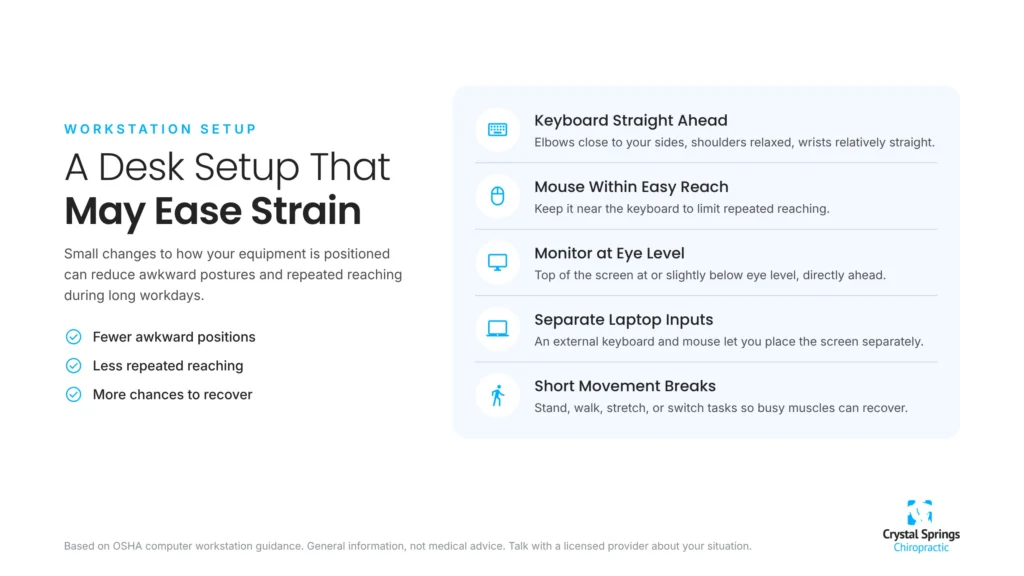
Ergonomic adjustments can reduce physical strain during computer work by improving posture, equipment positioning, and movement habits. OSHA’s computer workstation guidance provides recommendations for reducing awkward positions and improving workstation comfort.
Keyboard and Mouse Position
Keep the keyboard directly in front of your body, with elbows close to your sides and shoulders relaxed. Wrists should remain relatively straight rather than bent upward or sideways. Positioning the mouse near the keyboard also helps reduce unnecessary reaching.
Alternative keyboards and pointing devices can improve comfort for some workers, although no specific product guarantees injury prevention.

Monitor Height and Viewing Distance
Position the monitor directly ahead at a comfortable viewing distance, with the top of the screen generally at or slightly below eye level. Adjustments may be necessary based on individual comfort and vision needs.
Laptop users can benefit from an external keyboard and mouse, allowing the screen and input devices to be positioned independently.
Regular Movement Breaks
Taking short breaks from computer tasks can help reduce prolonged muscle tension and give frequently used muscles a chance to recover. OSHA recommends incorporating rest pauses and opportunities to change activities throughout the workday.
Try standing or walking briefly, gently stretching, or switching to a task that doesn’t require continuous keyboard and mouse use. Keyboard shortcuts, voice dictation, and alternating between different types of work may also help reduce repetitive movements.
The goal is to avoid spending hours in the same position or repeating the same movements without opportunities for recovery.
When Should Tech Workers Seek an Evaluation?
Mild soreness from computer work can improve with rest and activity adjustments. However, recurring or persistent symptoms may indicate a problem that needs professional evaluation.
Tech workers should consider seeking an evaluation when symptoms:
- Persist for several weeks or continue worsening
- Return when typing or mouse use resumes
- Interfere with typing, gripping, or daily activities
- Cause persistent tingling or numbness
- Affect hand strength or coordination
- Spread from the neck or shoulder into the arm
Progressive weakness, persistent loss of sensation, or significant neurological symptoms require prompt medical attention rather than waiting for symptoms to resolve.
A healthcare professional can assess joint mobility, muscle strength, sensation, reflexes, and symptom patterns to identify possible causes. Depending on the findings, further testing, physical or occupational therapy, or specialist care may be appropriate.

Get Help With Recurring Neck, Shoulder, and Muscle Pain in San Mateo
Repetitive strain symptoms can make everyday computer work uncomfortable, especially when pain returns despite taking breaks or changing activities. Understanding what’s contributing to your discomfort is an important step toward finding appropriate treatment.
Crystal Springs Chiropractic provides conservative musculoskeletal care in San Mateo, including chiropractic adjustments and soft-tissue therapies for selected conditions. The team can evaluate neck and shoulder stiffness, muscle tension, and movement limitations while identifying symptoms that may require additional medical care.
Contact Crystal Springs Chiropractic to schedule an evaluation and discuss your treatment options.
Make Your Workday More Comfortable
Schedule an evaluation at Crystal Springs Chiropractic to discuss recurring neck, shoulder, or upper back discomfort and appropriate treatment options.
Schedule an Appointment